The ⚡CYBER MONDAY⚡ Sale Continues!
Up to 30% OFF Supplies | $2500 OFF Equipment | New Deals Daily
Hurry! Ends soon or while supplies last. Click here for coupons and deals.


Shipping Icon Free Shipping on Qualifying Orders see details
xTool Apparel Printer Cutter Kit
xTool Apparel Printer Cutter Kit - 4KFzMrS1TAg
xTool Apparel Printer Cutter Kit - w0XjEce2byY
xTool Apparel Printer Cutter Kit - xtool1.webp
xTool Apparel Printer Cutter Kit - xtool2.webp
xTool Apparel Printer Cutter Kit - xtool3.webp
xTool Apparel Printer Cutter Kit - xtool4.webp
xTool Apparel Printer Cutter Kit - xtool5.webp
xTool Apparel Printer Cutter Kit - xtool6.webp
xTool Apparel Printer Cutter Kit - xtool01.png
xTool Apparel Printer Cutter Kit - xtool02.png
xTool Apparel Printer Cutter Kit - xtool03.png
xTool Apparel Printer Cutter Kit - xtoolprinterfront-1.png
xTool Apparel Printer Cutter Kit - xtoolprinterfront-2.png

xTool Apparel Printer Cutter Kit

$31.89

$28.99


Share:

DETAILS | RELATED ITEMS | FAQ

xTool Apparel Printer Cutter Kit

Keep your auto film-cutting crisp and consistent-replace worn parts and fine-tune cuts for a smoother DTF workflow.

Why You Need It

  • Restore cutting precision: Refresh the cutter assembly to eliminate ragged edges and misalignment after heavy use.
  • Reduce rework: Clean, accurate post-print cuts speed up weeding and transfer handling.
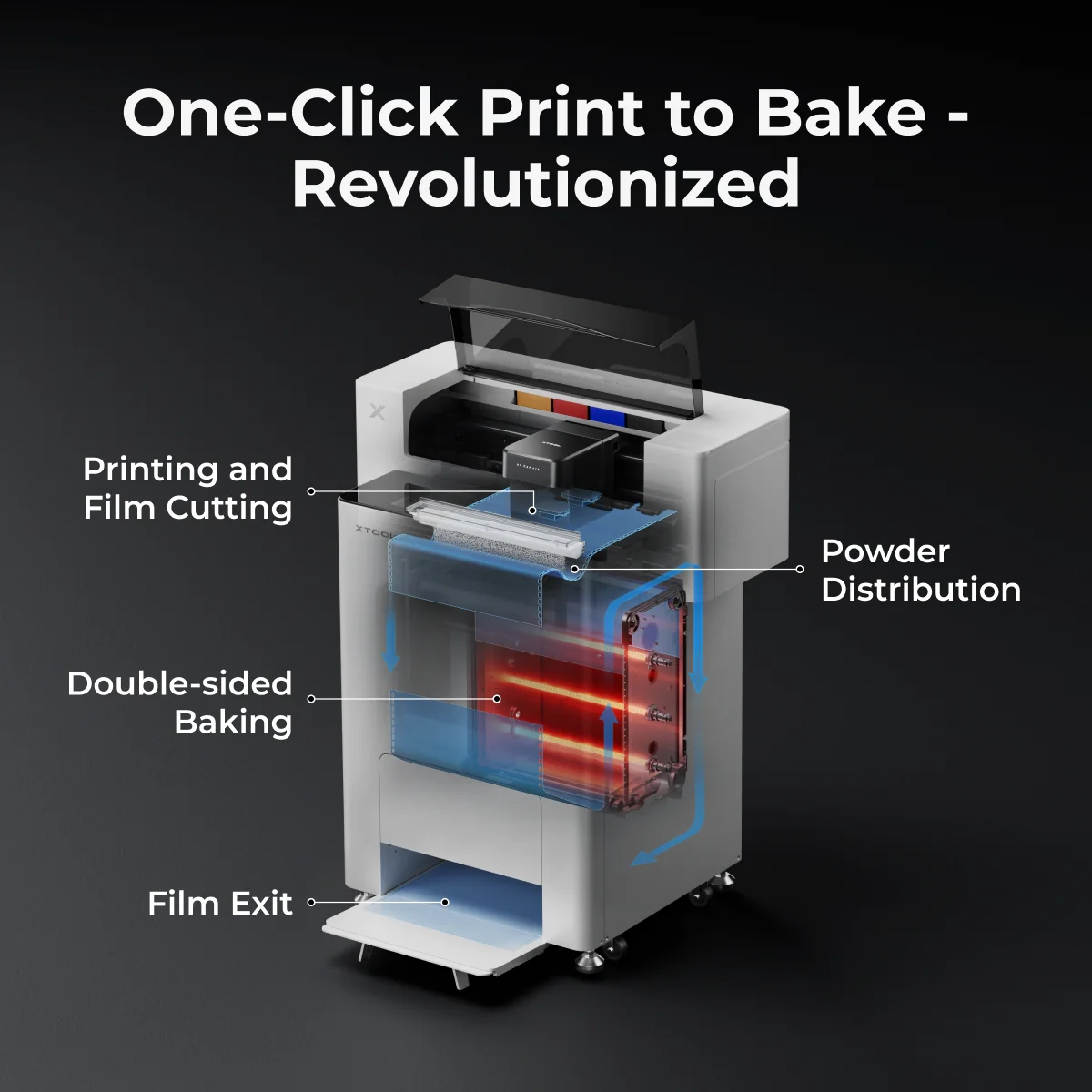
  • Designed for xTool apparel printing: Purpose-built for the xTool Apparel Printer's auto film-cutting feature and OS1 workflow.

What's Inside

  • Replacement cutter blade/knife (for the apparel printer's film-cut path)
  • Service tools (e.g., driver/hex key) for fast blade changes
  • Cleaning aids (brush/swabs) to clear debris from the cutting channel
  • Quick guide with safe-swap steps and alignment tips

Contents may vary slightly by batch or region.

When to Use

  • Dull or dragging cuts: Film shows frayed edges or incomplete separation.
  • Frequent jams: Debris buildup along the cut path.
  • Preventive care: Scheduled blade refresh to keep throughput high.

Quick Replacement Steps

  1. Power down and follow the printer's safety instructions.
  2. Open the cutter access and remove the worn blade with the included tool.
  3. Install the new blade/knife and secure per the guide.
  4. Clean the cut channel and run a short test cut for alignment.

Always refer to your xTool Apparel Printer manual for model-specific procedures.

Compatibility

  • Systems: xTool Apparel Printer family; integrates with the OS1 print-to-bake workflow.
  • Media: xTool DTF transfer films used in auto film-cutting.

Pro Tips

  • Keep the cut path clean-wipe dust and film flakes before long runs.
  • If cuts start drifting, perform the printer's built-in alignment check after a blade swap.
  • Store spare blades in a dry, labeled container away from powder and ink mist.


WARNING: WARNING: WORK IN A WELL VENTILATED AREA and use Protective Equipment (including masks and gloves) when working with specialty printing and curing products and processes (including DTF, DTG, UV etc.) as fumes and processes may be hazardous. We highly recommend the use of a fume extractor when working with DTF powder in addition to good ventilation and filtration in your work area. The use of all specialty ink printing equipment and supplies such as inks, chemicals, powders etc. are at the sole risk of the user. Specialty inks and film require a good humidity and temperature environment (55% - 75% humidity, and 75° to 80°F) to minimize risk of ink clogs and film buckling.



Close Popup
Shop now. Pay with Affirm. Learn More
Fast Processing
Fast Processing
Training & Onboarding
Worldwide Shipping
Worldwide Shipping
Flexible Payments
Flexible Payments

Subscribe for Coupons & New Products Alerts

Subscribe & Get 10% OFF

PRODUCTS

xTool Apparel Printer Cutter Kit