Free Shipping on Qualifying Orders see details |
FINANCING - 0% APR Available see details
👻
THE GHOST HUNT IS ON!
Find hidden ghosts. Reveal
$5 to $2,000 OFF!
Turn a compatible desktop pigment-based CMYK printer into a full-color garment-transfer workflow without converting it to conventional DTF ink and without running white ink through the printhead.
The MagicLine desktop-inkjet pathway is built around compatible printers using pigment-based CMYK ink. It is not a blanket claim that every home or office inkjet, dye-based ink system or printer model can produce a durable DTF-style transfer.
Use the compatible pigment-ink workflow rather than flushing and converting the printer to conventional DTF ink.
For dark garments, White/Soft White MagicPowder creates the opaque backing outside the printer instead of requiring a white-ink channel.
MagicSeal Fusion adds the protective finishing step designed to improve wash-and-wear performance of compatible pigment DTF Hack transfers.
The printer supplies the CMYK image. MagicLine transfer media carries that image, MagicPowder creates the hot-melt adhesive layer, and the finished transfer is heat pressed to the garment.
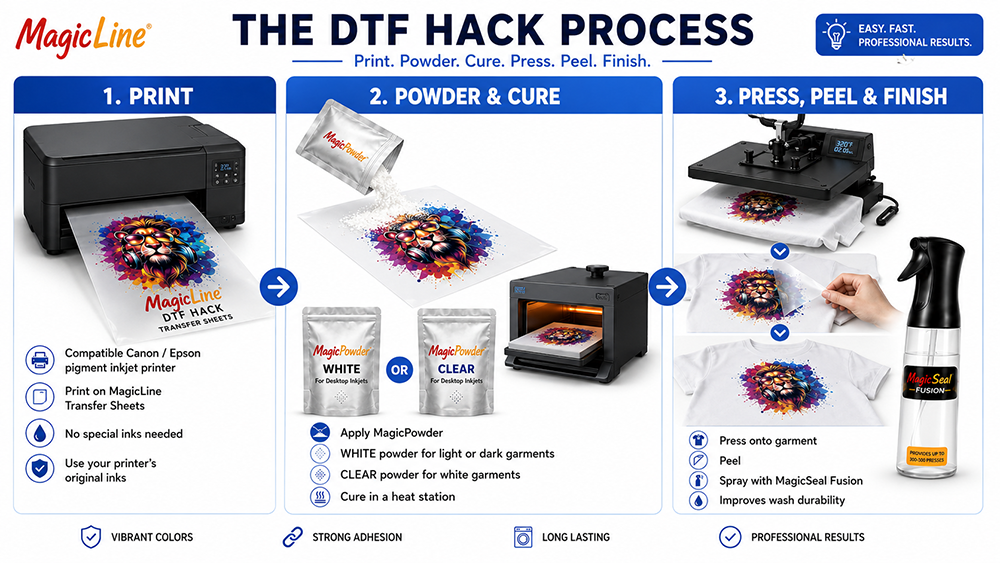
Traditional desktop-printer DTF conversions can involve changing ink chemistry and managing a white-ink system. The MagicLine pigment pathway instead uses a compatible pigment CMYK printer/ink combination with transfer sheets and powder designed for the DTF Hack process.
A CMYK pigment printer cannot print the opaque white underbase used by a conventional DTF printer. MagicLine moves that function to the powder layer.
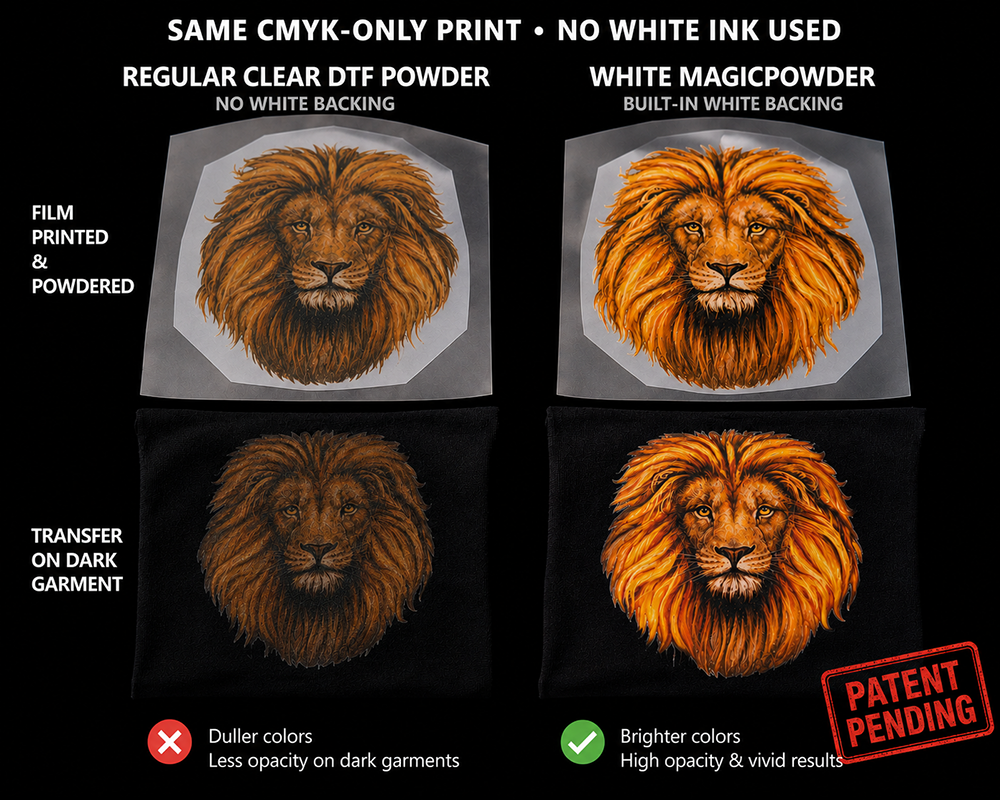
Patent-pending White and Soft White MagicPowder create both the hot-melt adhesive layer and an opaque backing behind compatible CMYK artwork. This helps keep printed colors visible on colored, dark and black garments.
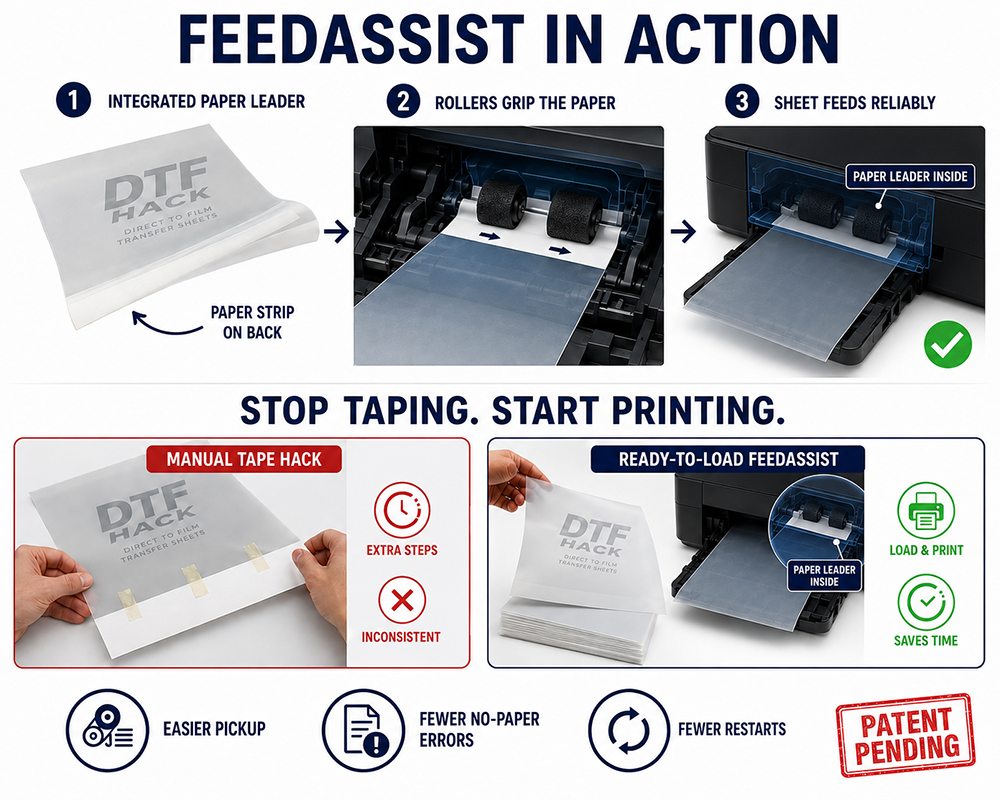
Slick transparent or translucent transfer film can be difficult for some desktop pickup rollers and optical media sensors. That problem is separate from print quality—and it is exactly what FeedAssist is designed to address.
FeedAssist includes an integrated paper leader on the back of the transfer sheet. The leader gives compatible pickup rollers a paper-like edge to grip and gives media sensors a recognizable leading edge.
| Garment | Recommended MagicPowder | Purpose |
|---|---|---|
| White garment | Clear, White or Soft White | Clear supplies adhesion while the white garment itself supplies the light background. |
| Light / colored garment | White or Soft White when opacity is needed | Helps isolate the CMYK image from the garment color. |
| Dark / black garment | White or Soft White | Creates the opaque backing missing from the CMYK-only printer. |
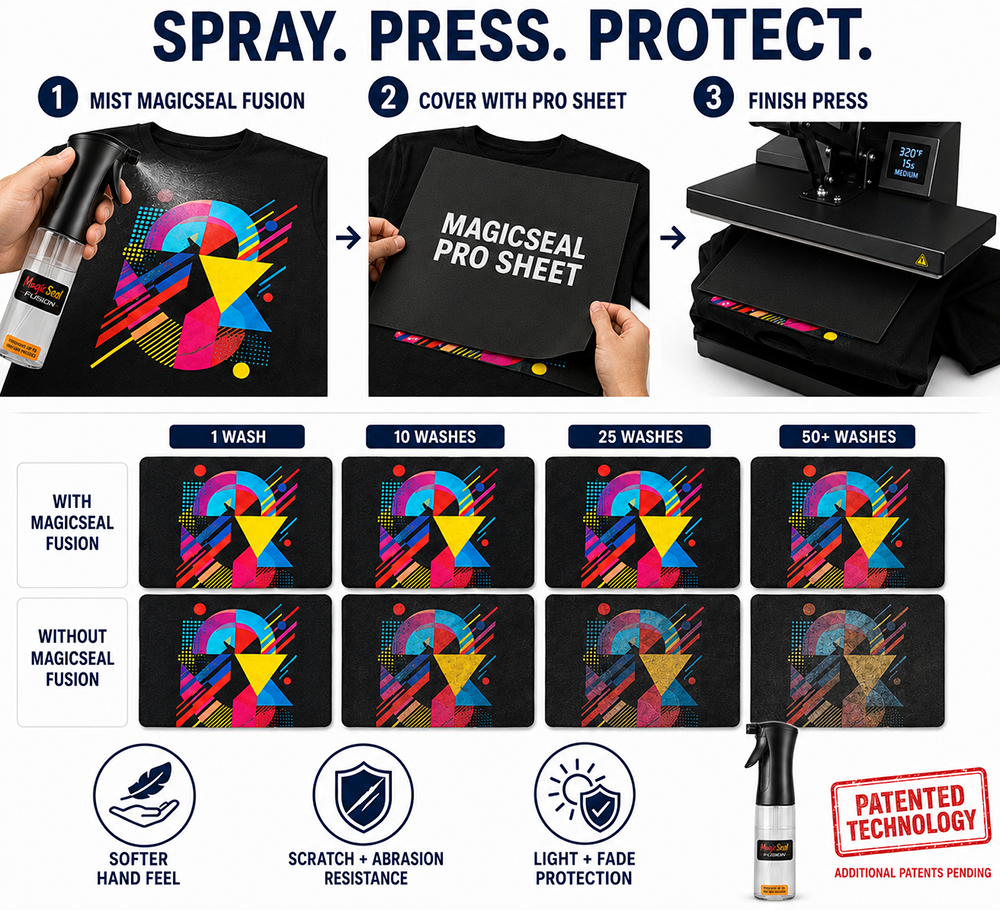
Pigment ink used in this DTF-style workaround is not conventional DTF ink. A transfer can look excellent immediately after pressing yet still need help with repeated laundering, abrasion and everyday wear.
After applying and peeling the transfer, MagicSeal Fusion is used under the recommended finishing process to create additional protection over the finished image. Properly produced compatible pigment DTF Hack transfers finished with Fusion may achieve 50+ wash performance under recommended conditions.*
The exact printer and media combination must be tested, but the system itself is simple.
A desktop CMYK printer using a tested pigment-based ink configuration. Do not assume that every office inkjet or dye-ink model is compatible.
Use standard or FeedAssist media as appropriate, then choose Clear versus White/Soft White powder based on garment color and opacity needs.
Cure and press according to the current instructions, then use Fusion/PRO Sheet when maximum durability and finish quality are desired.
Some compatible pigment-based desktop inkjet printers can be used for the MagicLine DTF Hack, but "regular inkjet" is too broad. Printer model, ink chemistry, media handling and print settings all matter, and dye-based office ink should not automatically be treated as equivalent to pigment ink.
Not in the compatible MagicLine pigment workflow. The concept is to use a tested pigment CMYK printer/ink combination with MagicLine transfer media and powder rather than converting the printer to conventional DTF ink.
White or Soft White MagicPowder creates an opaque backing behind compatible CMYK artwork. The white layer therefore comes from the powder rather than from white ink printed through the printer.
It eliminates white-ink clogging because there is no white ink in the printer in this workflow. Normal CMYK inkjet maintenance is still required, and any printer can experience maintenance or ink-flow issues unrelated to white DTF ink.
FeedAssist addresses media handling. Its integrated paper leader helps compatible desktop printers grip and detect transfer sheets that might otherwise slip, fail to load or trigger no-paper errors.
Because pigment ink in a DTF Hack transfer is not conventional DTF ink, MagicSeal Fusion adds a protective finishing step intended to improve wash-and-wear performance, abrasion resistance and finished feel.
*Up to 50+ wash performance is a potential result, not a guarantee. Results vary by printer, pigment ink, transfer media, powder, curing, garment, press settings, application and laundering. Use only tested and approved combinations and current MagicLine instructions.
The sublimation pathway has a different reason for using the DTF Hack: expanding an existing sublimation setup beyond traditional light-polyester applications to cotton and dark garments.


Subscribe for Coupons & New Products Alerts
Subscribe & Get 10% OFF

Discover premium Direct to Film (DTF) printing at DTG Pro. Shop high-quality DTF Transfers.




PRODUCTS