THE MAGICLINE DTF HACK SYSTEM
DTF Hack: Sublimation & Pigment Inkjet Transfers Without White Ink
The DTF Hack lets you create DTF-style garment transfers with a compatible sublimation or pigment-based desktop inkjet printer you may already own. Instead of using a conventional DTF printer with white ink, the MagicLine workflow uses compatible transfer media, MagicPowder and finishing solutions to create transfers for light, colored and dark garments.
No Dedicated White-Ink DTF Printer Required
Dark Shirts—Including Black
Up to 50+ Wash Potential*
FeedAssist for Difficult Film Feeding
DTF HACK EXPLAINED
DTF-Style Transfers Without a Conventional CMYK + White DTF Printer
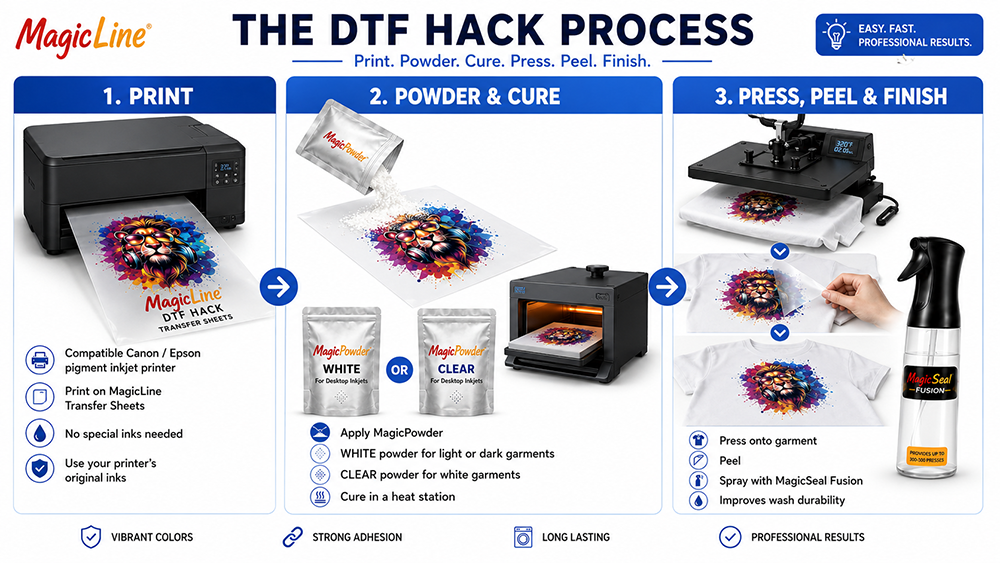
The DTF Hack uses a compatible CMYK printer, transfer media, hot-melt powder, curing and heat pressing to create a garment transfer. The exact reason for using the hack differs by printer type, which is why MagicLine now separates the workflow into two focused paths.
1
Print
Print mirrored artwork with the compatible sublimation or pigment-ink workflow for your printer and MagicLine transfer media.
2
Powder, Cure & Press
Use Clear MagicPowder for white garments or White/Soft White MagicPowder when the design needs an opaque backing on colored or dark garments.
3
Finish & Protect
Finish the applied transfer with MagicSeal Fusion under the recommended workflow to improve wash-and-wear performance and surface protection.
START WITH THE PRINTER YOU HAVE
Which DTF Hack Path Fits You?
The supplies overlap, but the customer need and technical explanation are different. Choose the page written specifically for your printer and ink workflow.
SUBLIMATION PATH
I Have a Sublimation Printer
Already use sublimation for polyester, mugs or coated products? Learn how a DTF-style workflow can extend a compatible sublimation printer to cotton and other garments, including dark shirts when an opaque white backing is used.
This DTF sublimation hack is designed for compatible sublimation printers that need a way to move beyond traditional light-polyester sublimation and work with cotton and other supported garments.
- Sublimation on cotton via a DTF-style transfer layer
- DTF with sublimation ink and compatible transfer media
- Dark and black shirts using White/Soft White MagicPowder
- Film feeding, powder selection and washability guidance
Explore DTF With a Sublimation Printer
PIGMENT INKJET PATH
I Have a Pigment Inkjet Printer
Use a compatible pigment-based desktop inkjet to create full-color DTF-style transfers without converting the printer to conventional DTF ink or running white ink through the printhead.
- DTF with a compatible desktop inkjet printer
- No DTF-ink conversion for the approved workflow
- Dark shirts using White/Soft White MagicPowder
- FeedAssist and MagicSeal finishing options
Explore DTF With a Pigment Inkjet Printer
THE MAGICLINE ADVANTAGE
Three Common DTF Hack Problems—Three Focused Solutions
Whichever printer path you use, the same production problems tend to appear: no white underbase, inconsistent long-term durability and slick film that some desktop printers do not feed reliably.
| Problem | MagicLine Solution | What It Helps Unlock |
|---|
| No White Ink in the Printer | Patent-Pending White or Soft White MagicPowder® | Creates an opaque white backing behind compatible CMYK transfers so color can remain visible on dark garments—including black—without white ink in the printer. |
| DTF Hack Washability | MagicSeal® Fusion | Helps improve wash-and-wear performance, surface protection and finished feel. Properly produced compatible transfers may reach 50+ washes under recommended conditions.* |
| Film Will Not Feed | Patent-Pending FeedAssist Transfer Sheets | An integrated paper leader gives compatible rollers and media sensors a more conventional leading edge without manually taping paper to every sheet. |
DARK GARMENT DIFFERENCE
The White Backing Comes From the Powder
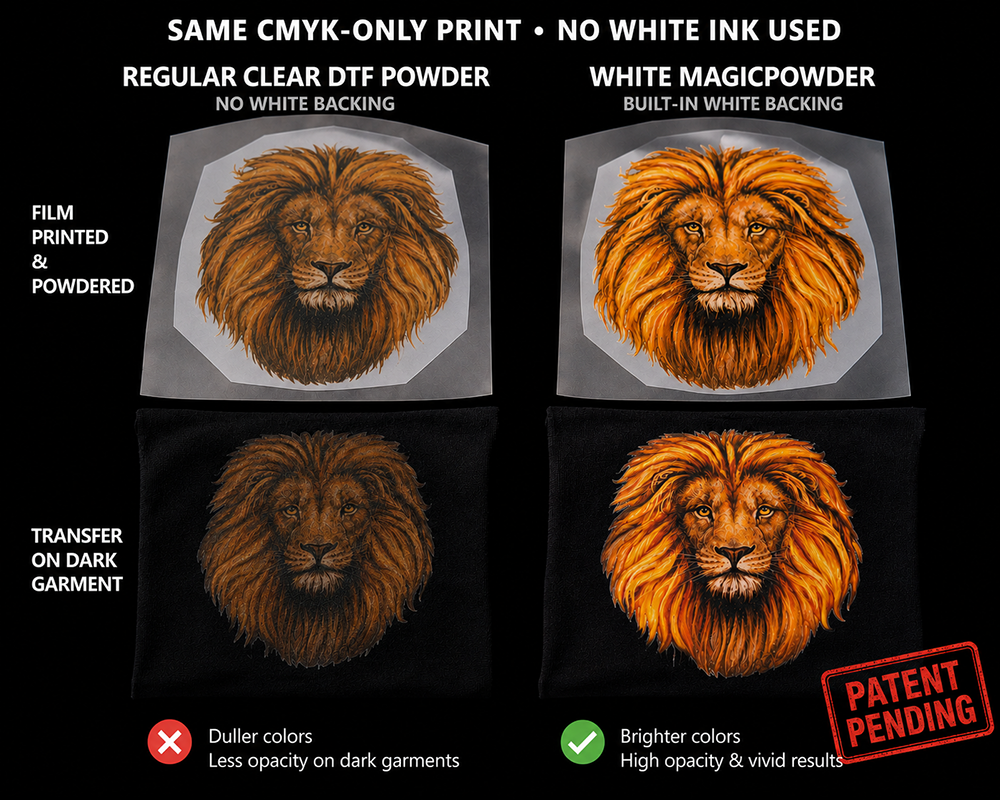
Desktop pigment and sublimation printers normally print CMYK only. Patent-pending White and Soft White MagicPowder are designed to provide both the adhesive layer and an opaque backing behind the printed color, performing the color-supporting role normally handled by white DTF ink.
- Expand compatible transfers to colored, dark and black garments
- Avoid putting white ink into the printer
- No white-ink settling, agitation or circulation system in this workflow
Shop MagicPowder®
That is what makes the MagicLine workflow different from conventional white-ink DTF printing: the printer does not need a white ink channel or white ink circulation system to create the opaque backing.
THE CORE WORKFLOW
Print. Powder. Cure. Press. Peel. Finish.
The details vary by printer and ink type, but the overall DTF Hack process remains straightforward. Use the pathway page for your printer to see the specific explanation, compatibility considerations and recommended product choices.
Safety: Powdering, curing and heat pressing involve airborne powder, fumes and hot equipment. Work in a well-ventilated area, use appropriate protective equipment and follow the current operating instructions for every product and machine used.
SHOP THE SYSTEM
The Consumables Behind the MagicLine DTF Hack
Choose the transfer sheet and powder appropriate to your tested printer/ink/garment combination, then add MagicSeal Fusion when maximum wash-and-wear performance is the goal.
MagicLine Transfer Sheets
Standard and FeedAssist options for compatible DTF Hack workflows. FeedAssist is designed for printers that struggle to grip or recognize slick transfer media.
Shop Transfer SheetsMagicPowder®
Choose Clear for workflows where the garment supplies the light background, or White/Soft White when an opaque backing is needed for colored or dark garments.
Shop MagicPowderMagicSeal® Fusion
A finishing step designed to improve the durability, protection and feel of compatible DTF Hack transfers under the recommended process.
Shop MagicSeal
What Is a DTF Sublimation Hack?
A DTF sublimation hack is a transfer workflow that uses a compatible sublimation printer to create DTF-style garment transfers. The sublimation printer produces the color image on compatible transfer media, while MagicPowder provides the adhesive layer and, when needed, the opaque backing for colored and dark garments.
Can You Do DTF Without White Ink?
Yes. With a compatible MagicLine workflow, the printer does not need white DTF ink to create the opaque backing. White or Soft White MagicPowder provides the backing behind the CMYK image, allowing compatible transfers to be applied to colored, dark and black garments.
What is the DTF Hack?
It is a way to create DTF-style heat transfers with a compatible sublimation or pigment-based desktop printer rather than a conventional CMYK + white DTF printer. The mirrored image is printed to compatible transfer media, powdered, cured and heat pressed.
Can I use a sublimation printer for the DTF Hack?
Yes, with a tested compatible sublimation printer, ink and transfer-sheet combination. The sublimation pathway is especially attractive to users who already own sublimation equipment and want to decorate cotton or other garments outside the normal light-polyester sublimation workflow. See the DTF With a Sublimation Printer guide.
Can I use a regular inkjet printer for DTF?
Compatible pigment-based desktop inkjet printers can be used in the MagicLine workflow without converting them to conventional DTF ink. Do not assume that every desktop or dye-based inkjet is compatible. See the DTF With a Pigment Inkjet Printer guide.
Can the DTF Hack work on dark or black shirts?
Compatible CMYK-only transfers can be expanded to dark garments using patent-pending White or Soft White MagicPowder to create an opaque backing behind the printed color. Exact results depend on the complete printer, ink, media, powder and pressing workflow.
What if my printer will not feed DTF film?
FeedAssist Transfer Sheets include an integrated paper leader intended to help compatible pickup rollers grip the sheet and help media sensors recognize the leading edge without manually taping paper to each sheet.
*Up to 50+ wash performance is a potential result for properly produced and applied compatible pigment-ink and sublimation DTF Hack transfers finished with MagicSeal Fusion under recommended conditions. It is not a guarantee. Results vary by printer, ink, media, powder, curing, garment, press settings, application and laundering.
Compatibility and final performance depend on printer model, ink chemistry, print settings, transfer media, powder selection, curing, heat-press settings, garment composition and laundering. Use only tested and approved combinations and follow current MAGICLINE application instructions.
Intellectual Property Notice: MagicSeal® technology is patented, with additional patents pending. MagicPowder® and MagicLine FeedAssist technologies are patent pending. Product configurations, claims and application instructions are subject to current MAGICLINE specifications and documentation.
 Free Shipping on Qualifying Orders