Free Shipping on Qualifying Orders see details |
FINANCING - 0% APR Available see details
👻
THE GHOST HUNT IS ON!
Find hidden ghosts. Reveal
$5 to $2,000 OFF!
Already own a sublimation printer? The DTF Hack gives compatible sublimation users a way to move beyond the normal light-polyester workflow and create full-color transfers for cotton and other garments—without buying a conventional white-ink DTF printer.
Traditional dye sublimation is excellent for suitable polyester and polymer-coated substrates, but ordinary sublimation does not directly provide an opaque white underbase and is not designed to dye untreated cotton fibers. The DTF Hack changes the transfer mechanism so the printed image can be carried to the garment by a hot-melt adhesive layer.
Use a tested compatible sublimation printer and ink instead of purchasing another printer solely to explore DTF-style garment transfers.
The transfer powder creates the adhesive layer that bonds the printed transfer to the garment, rather than relying on dye sublimation directly into cotton fibers.
Patent-pending White or Soft White MagicPowder can provide the opaque backing that a CMYK-only sublimation printer cannot print.
A compatible sublimation printer creates the mirrored CMYK artwork on the transfer sheet. MagicPowder is then applied to the printed image, the powder is cured according to the applicable workflow, and the finished transfer is heat pressed onto the garment.
The important difference from traditional sublimation is where the image ends up. Instead of relying on sublimation dye to bond directly with cotton, the printed image becomes part of a transfer layer that is bonded to the garment with hot-melt adhesive powder.
For dark garments, White or Soft White MagicPowder can provide the opaque backing needed behind the CMYK image because a standard sublimation printer does not print white.
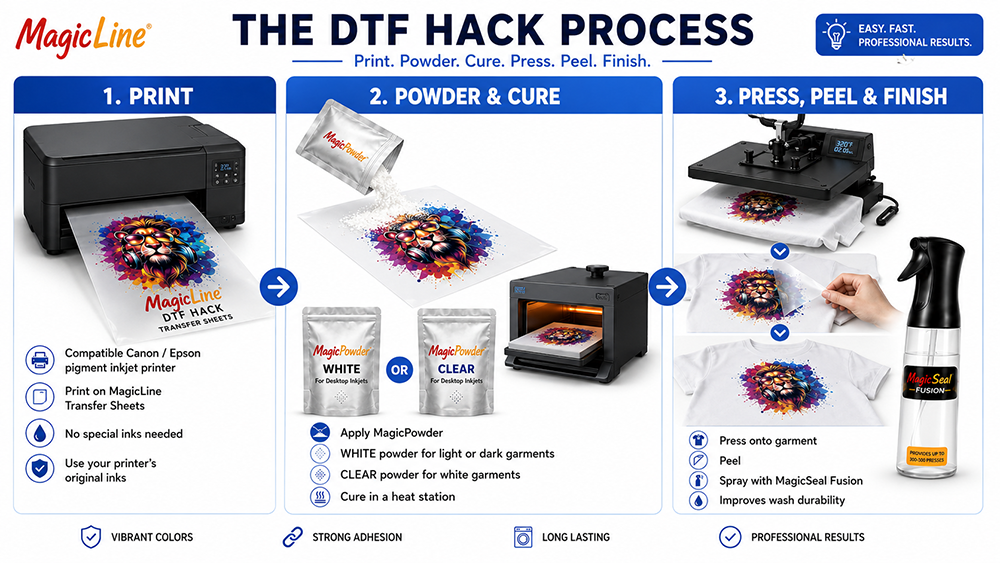
The transfer sheet is a key part of a sublimation DTF workflow. Sublimation ink needs to print cleanly onto the coated surface without excessive beading, bleeding or spreading, while the printed image must remain suitable for consistent powder application.
The transfer sheet also needs to work properly with the printer's feeding system and allow the finished transfer to release correctly after curing and heat pressing. A generic DTF film should not automatically be assumed to perform the same way with sublimation ink, since different coatings can affect ink wetting, powder adhesion and transfer release.
For shops looking for DTF film for sublimation printer applications, the printer, sublimation ink and transfer sheet should be treated as a complete system. Using a compatible and tested combination helps provide more consistent results from printing through final garment application.
Shop MagicLine Transfer SheetsYes, when the transfer sheet is compatible with the specific sublimation printer and ink workflow. The important point is that not every generic DTF film is designed to handle sublimation ink in the same way.
The transfer sheet's coating affects how the sublimation ink sits on the surface, how well the powder adheres to the printed image and how the transfer releases during garment application. Printer feeding is another consideration, particularly with desktop machines that may handle specialty transfer media differently from standard paper.
A reliable setup should be evaluated as one complete workflow: compatible sublimation printer + sublimation ink + transfer sheet + MagicPowder + curing + heat pressing. When changing one part of the system, test the complete combination before moving into production.
For this reason, choose a transfer sheet that is intended or tested for the specific sublimation DTF workflow rather than assuming that any standard DTF film will deliver the same results.
The short answer: the DTF-style transfer layer makes sublimation on cotton possible. Traditional sublimation relies on a suitable polyester or polymer-coated surface, while this workflow places the printed image on transfer media and uses hot-melt adhesive powder to bond the finished transfer to the garment.
That means the sublimation printer is still responsible for producing the CMYK image, but the transfer system changes how that image is applied to the garment. This allows compatible workflows to be used on cotton and other supported garments where conventional direct sublimation would not be the appropriate process.
A normal sublimation printer prints CMYK, not white. On a dark shirt, the garment color can overpower the printed colors unless the transfer includes an opaque light backing.
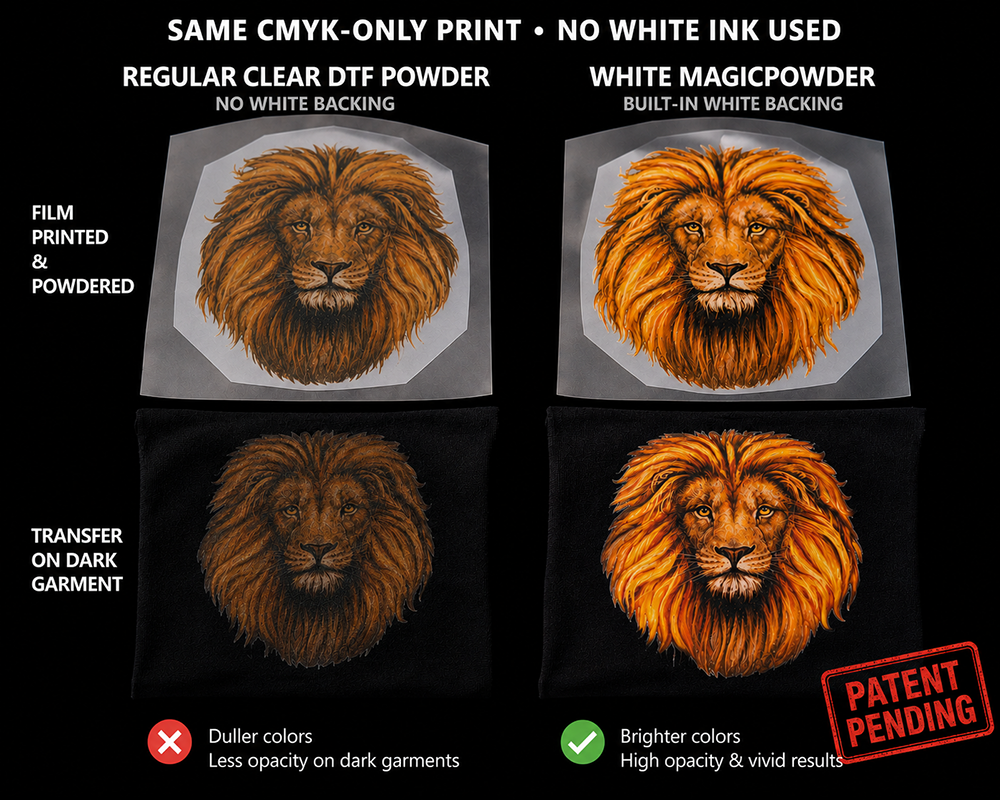
Patent-pending White and Soft White MagicPowder are designed to perform two jobs: form the hot-melt adhesive layer and create an opaque backing behind the printed CMYK image. This can expand compatible sublimation DTF Hack transfers to colored, dark and black garments without putting white ink into the printer.
| Garment / Goal | Powder | Why |
|---|---|---|
| White garment | Clear, White or Soft White MagicPowder | The white garment itself provides the light background, so Clear can be sufficient when the tested workflow calls for it. |
| Light colored garment | White or Soft White MagicPowder when stronger opacity is needed | An opaque backing helps isolate the CMYK image from the garment color. |
| Dark / black garment | White or Soft White MagicPowder | The powder provides the opaque backing the sublimation printer cannot print. |
| Sublimation DTF on dark / black garments | White or Soft White MagicPowder | Provides the opaque backing needed to keep the CMYK image visible against the garment color. |
Desktop sublimation printers can vary in how they handle specialty transfer media. Before production, confirm that the printer, sublimation ink and MagicLine™ transfer sheet are compatible with the intended workflow.
Media feeding is also worth checking. Specialty transfer sheets can behave differently from standard paper, so proper sheet orientation, media handling and pickup are important for consistent printing. For compatible printers that need additional feeding assistance, FeedAssist is designed to provide a more conventional leading edge for media pickup and detection.
If you are considering an Epson EcoTank or another desktop sublimation printer, verify compatibility for the exact printer model and current MagicLine™ application instructions before purchasing media for production.
It would be inaccurate to say sublimation itself has poor washability. Proper sublimation on compatible polyester can be extremely durable. The durability question changes when sublimation ink is used in a DTF-style transfer on cotton because the image is now part of an adhesive transfer layer rather than dyed directly into polyester.
MagicSeal Fusion is the finishing step in the MagicLine DTF Hack workflow. After the transfer is applied and peeled, Fusion is used under the recommended finishing process to improve wash-and-wear performance, surface protection and finished feel.
Properly produced compatible sublimation DTF Hack transfers finished with Fusion may achieve 50+ wash performance under recommended conditions.*
Shop MagicSeal® Fusion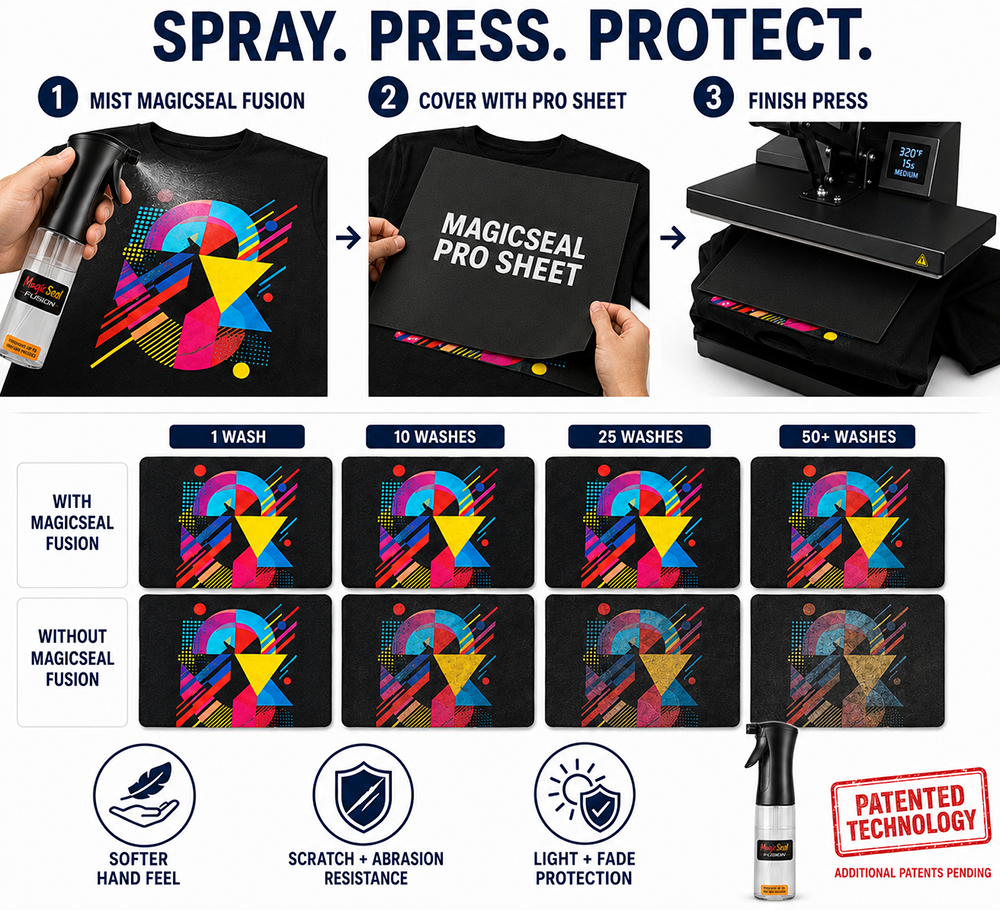
| Application | Traditional Sublimation | MagicLine Sublimation DTF Hack |
|---|---|---|
| Light polyester | Excellent fit | Possible, but usually unnecessary if normal sublimation already suits the job |
| 100% cotton | Not a conventional direct-sublimation substrate | Potentially compatible through the DTF-style transfer layer |
| Dark cotton / black shirts | No white underbase from a CMYK sublimation printer | White/Soft White MagicPowder can provide the opaque backing in a tested workflow |
| White ink printer required | No | No |
| Film-feeding assistance | Not applicable to ordinary sublimation paper | FeedAssist option for compatible printers that struggle with slick transfer media |
The best choice is a transfer sheet specifically designed or tested for use with sublimation printers and inks. Coatings vary by manufacturer and can affect how evenly the ink prints, how well the powder adheres, how reliably the sheet feeds through the printer, and how cleanly the finished transfer releases. MagicLine Desktop Transfer Sheets feature a coating formulated for compatibility with a range of sublimation printers and ink combinations. For best results, confirm compatibility with your specific setup and follow the current MagicLine application instructions.
Yes, with a compatible sublimation DTF workflow. The sublimation printer applies the CMYK image to the transfer sheet, MagicPowder provides the hot-melt adhesive layer, and the finished transfer is heat pressed onto the garment. The printer, sublimation ink, transfer sheet and powder should be used as a compatible system and tested before production.
Yes, with a tested compatible sublimation printer, sublimation ink and transfer-media combination. The process is often called the DTF sublimation hack because it uses DTF-style film/sheets and hot-melt powder without converting the printer to conventional DTF ink.
Not as ordinary direct dye sublimation into untreated cotton. But, with the DTF Hack, sublimation ink prints the color image onto transfer media and the hot-melt powder creates the garment-bonding layer, allowing the finished transfer to be applied to many garment types, including cotton.
Yes, using MagicLine White or Soft White MagicPowder to provide an opaque backing behind the CMYK image. The sublimation printer itself still does not print white.
Some conventional DTF films may accept sublimation ink, but coatings, ink load, wetting, release behavior and printer feeding vary. MagicLine recommends using a tested transfer sheet and exact printer/ink combination rather than assuming every DTF film will perform the same.
Some desktop sublimation printers have difficulty gripping or detecting slick transparent/translucent transfer media. FeedAssist provides an integrated paper leader to help compatible pickup rollers and media sensors engage the sheet without a manually taped paper strip.
Traditional sublimation on compatible polyester is already durable. When sublimation ink is used with transfer sheets and adhesive powder on garments such as cotton, it creates a different, DTF-style transfer layer, which has lower washability. MagicSeal Fusion Spray is designed to improve the wash durability, helping the finished print withstand repeated laundering.
*Up to 50+ wash performance is a potential result, not a guarantee. Results vary by printer, sublimation ink, transfer media, powder, curing, garment, press settings, application and laundering. Use only tested and approved combinations and current MagicLine instructions.
The pigment pathway has a different technical explanation and customer use case. See the dedicated guide for compatible desktop pigment printers.


Subscribe for Coupons & New Products Alerts
Subscribe & Get 10% OFF

Discover premium Direct to Film (DTF) printing at DTG Pro. Shop high-quality DTF Transfers.




PRODUCTS